
(RE) INTRODUCING THE VIRTUAL PAINT MIXER
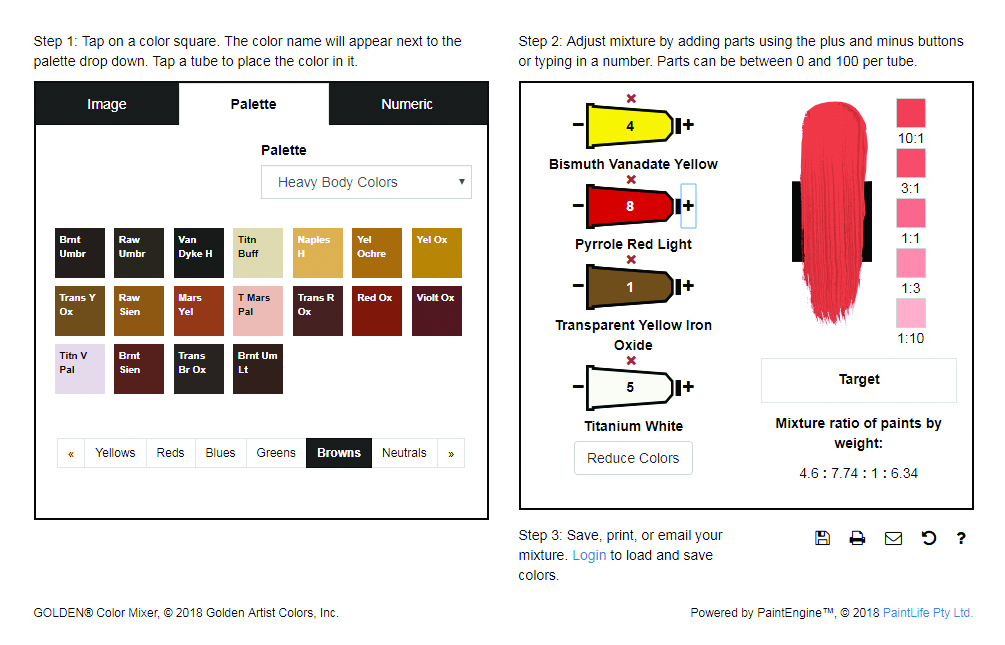 We are excited to introduce a host of new features and improvements to our Virtual Paint Mixer (MXR). These additions were inspired by your feedback and with the hope that it becomes an even more important and enjoyable tool for artists. So, as our holiday present to you, our customers, we are releasing Mixer 1.1 with the following improvements and features:
Color reduction is back!
This feature was taken offline while we worked on the updates, but now it is back with a vengeance! Once again you can reduce a mix all the way down to a single color with the press of a button. Even more exciting, you can now undo your reduction all the way back to your original mix! Simply press the ‘undo reductions’ button for each step back that you want to go!
Chromatic color order
Color swatches are now organized by hue (yellows, reds, blues, greens, browns, and neutrals) and displayed in chromatic order, allowing you to easily locate your favorite color.
Color name abbreviations
Abbreviations for each color are now right on the swatch, making it easier to know which one you are selecting.
Single pigment and color set palettes
A single pigment palette has been added to the available swatch palettes, and watch for other sets to be added in the future.
Image upload is back!
Users can once again upload their images to the MXR without having to worry about aspect ratios or manual cropping.
Volume-to-weight conversion
Until recently, mixtures have been shown as a volume ratio. We are pleased to expand on this by providing automatic volume-to-weight conversion for every mix! The precise mix ratios are calculated in real time, and displayed below the Target button. The ratio can be used for grams, ounces, or whatever measurement scale you choose!
Go to GOLDEN Virtual Paint MXR and try it!